
Most articles about 3D product animation software read like a Wikipedia dump — Maya for Hollywood, Houdini for VFX, then a hobbyist GIF maker thrown in for no reason. That’s not useful if you’re a product manager who needs an animated explainer for a new piece of equipment next quarter. So here’s the studio version: the tools we actually open every week, what each one earns its keep doing, and the places where software choice barely matters compared to who’s driving it.

Quick framing first. We run a 3D visualization studio — over 2 decades of work, 1,500+ projects across architecture, product CGI, animation, and interactive 3D. Product animation is one of our core services. The stack below is what we use to deliver it, not a feature comparison chart.
What 3D product animation software actually has to do
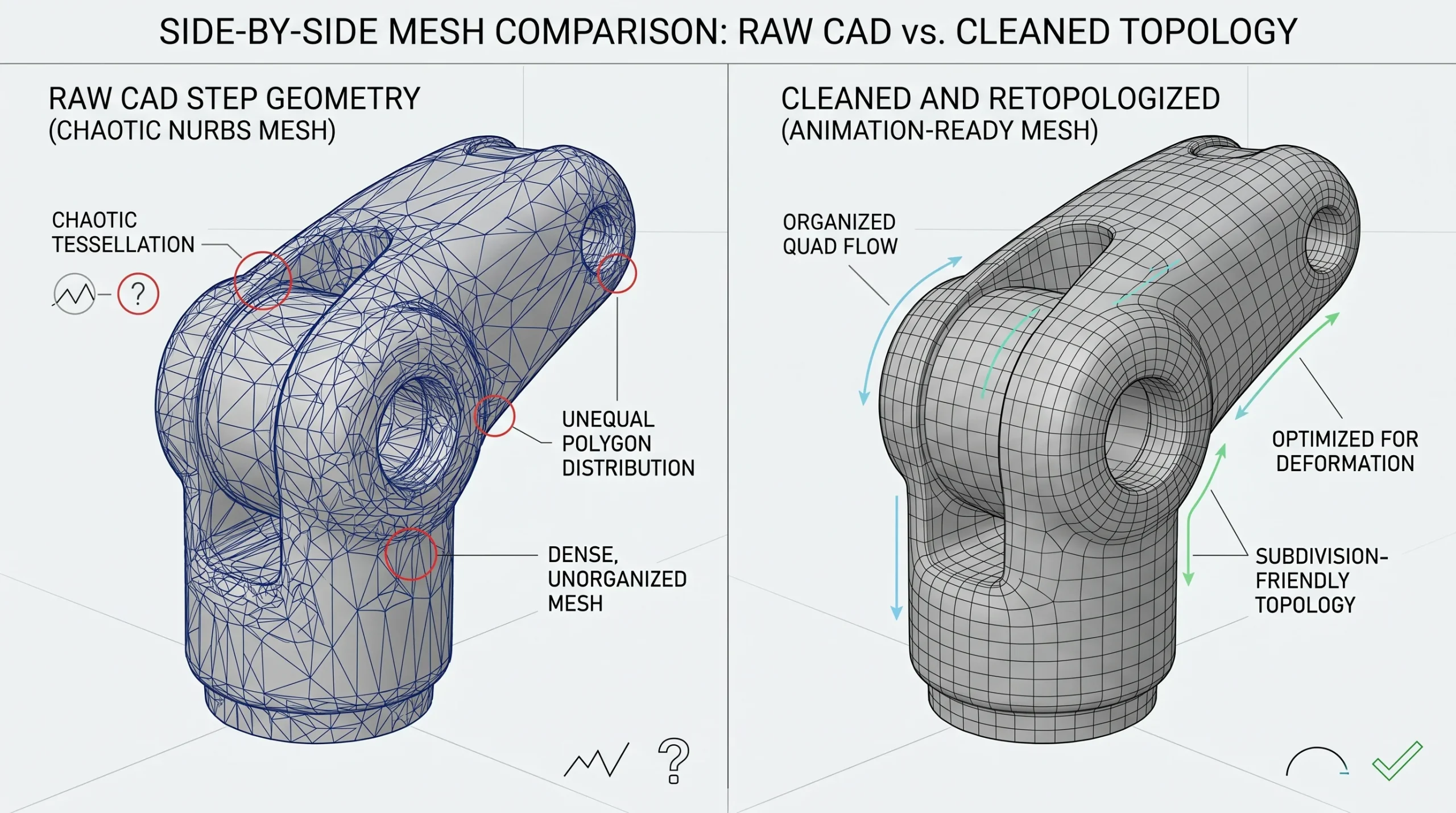
Strip away the marketing and a product animation pipeline has four jobs. Take a CAD model — usually a STEP file from engineering — and turn it into clean render geometry. Build materials that look like the real thing (brushed aluminum, anodized parts, textured plastic, glass with realistic refraction). Animate the camera and any moving mechanisms. Then composite, color-grade, and cut the whole thing into a video that explains the product.
Every tool in our stack maps to one of those jobs. Nothing is in there because it’s trendy.
3ds Max — where most of the work actually happens
3ds Max is our primary 3D application for product animation. Geometry cleanup after a CAD import, modeling any parts engineering didn’t supply, scene assembly, animation, lighting setup, camera work. It’s not glamorous to admit but most of the day-to-day craft happens here, not in some specialty tool.
Why 3ds Max for product work specifically:
- STEP and IGES import is reliable. You still have to clean the result — CAD geometry is full of NURBS-derived mess that doesn’t render efficiently — but the import works.
- The modifier stack lets us non-destructively clean and retopologize parts that came in too dense or with broken normals.
- Animation tools are mature. Hierarchies, constraints, expose transforms — all the stuff you need to animate a hydraulic arm or a folding mechanism without fighting the software.
- It plugs into Corona Renderer cleanly, which matters because rendering is where production timelines live or die.
Maya can do all of this too. We don’t argue with anyone who prefers it. We use Max because that’s where our pipeline is sharp.
Corona Renderer — the photoreal engine
Corona Renderer is our primary renderer for both architectural and product work. For product animation it earns its place by being predictable. You set up materials and lighting, you get a rendered frame, the result looks like what you expected. That sounds boring. It’s actually the whole game.
Production reality: an animation might be 600 frames at 4K. If a renderer takes an extra 30 seconds per frame, you’ve added five hours to the job. Multiply that by revision rounds and the math gets ugly fast. Corona’s universal default settings and progressive rendering let us preview almost-final quality fast, then commit to a final pass with confidence.
For client review rounds, we often deliver a clay render or matte-shaded pass first. Half the value of a clay render is that everyone shuts up about texture choices until the camera angle and timing are locked. Saves a week.
After Effects and Premiere Pro — the second half of the job
Here’s a thing rookie product animation buyers don’t always realize: the 3D part is maybe 60% of the work. The other 40% is compositing and editing. Render passes get assembled in After Effects — diffuse, reflection, shadow, depth, ID mattes — and that’s where color correction, lens effects, motion blur tuning, and any 2D overlays (callouts, dimensions, animated logos) go.
Premiere Pro handles the cut. Voiceover sync, music, pacing, transitions between scenes. A 90-second product explainer is usually four or five separate animated sequences edited together — not one long take.
If anyone tells you they can deliver a finished product animation from a renderer alone, they’re either lying or about to deliver something flat.
Blender — selective use, mostly modeling
We use Blender selectively. It’s excellent for certain modeling tasks — sculpting, retopology, some procedural workflows — and the price is right. We don’t pretend it’s our primary tool, because honestly, our pipeline is built around 3ds Max plus Corona, and switching for the sake of switching would slow us down. But for one-off modeling jobs or specific workflows where Blender genuinely is the better tool, we use it.
AutoCAD — for the engineering handoff
Sometimes a product animation project starts with DWG drawings rather than a 3D CAD file. AutoCAD lets us interpret the engineering intent, import 2D drawings as reference, and bridge to the 3D pipeline. Not flashy, but if you’ve ever tried to animate a product from blurry PDF cutsheets, you’ll appreciate having someone on the team who reads drawings fluently.
ZBrush and SolidWorks — when the project calls for them
ZBrush is in the kit for organic shapes — anything sculptural, characters, or detailed surfacing that’s painful to do with polygonal modeling. SolidWorks shows up when we get pulled into the more technical end of product modeling and a client’s data is in a SolidWorks-native format. Neither is a daily driver. Both have saved jobs.
What about the software the original article mentioned?
To be honest about it: Easy GIF Animator and Anime Studio Pro don’t belong on a serious product animation tools list. Toon Boom Harmony is for traditional 2D character animation. Motion Builder is a motion capture pipeline tool — useful for character work, irrelevant to a product explainer. Houdini is exceptional, particularly for effects and procedural work, but for the volume of product animation jobs we run, the overhead doesn’t pay off versus 3ds Max plus Corona.
The “list of every animation tool” approach makes for searchable content. It doesn’t help you make a decision.
The software is a small part of why a product animation works
This is the part that doesn’t make it into software comparison posts. A clean STEP import is worth more than a fancier renderer. A camera move that respects the product’s geometry beats any post effect. Knowing when to cut to a sectioned view, when to slow down, when to fade an annotation in — those calls are pipeline experience, not tool features.
We’ve watched plenty of beautifully-rendered animations land flat because the storytelling wasn’t there. We’ve watched modest animations land hard because the team understood what the client actually needed to communicate. The tools matter. They matter less than the people running them.
Related reading from our studio
If you’re researching product animation more broadly, our 3D product animation service page covers what deliverables look like and how a project is scoped. For the visualization side — still images, marketing renders, hero shots — see 3D product visualization. And if you want a deeper read on the compositing side, our notes on After Effects for animation and compositing get into the practical details.