
After Effects for 2D animation is one of those tools that quietly does the heavy lifting on a project nobody talks about until the deadline gets tight. We reach for it almost every week — for explainer videos, product spots, title sequences on architectural walkthroughs, and the dozens of small compositing jobs that turn a raw 3D render into something a client actually wants to share. This article is about how the program fits into our pipeline, not a tutorial on what buttons to press.
If you’ve landed here looking for a software review, fair warning: we’ll mention features, but the point is the work. The studio has run animation jobs through After Effects for years alongside our architectural animation and product motion work, and the patterns are familiar by now.
Where After Effects for 2D animation fits in our pipeline
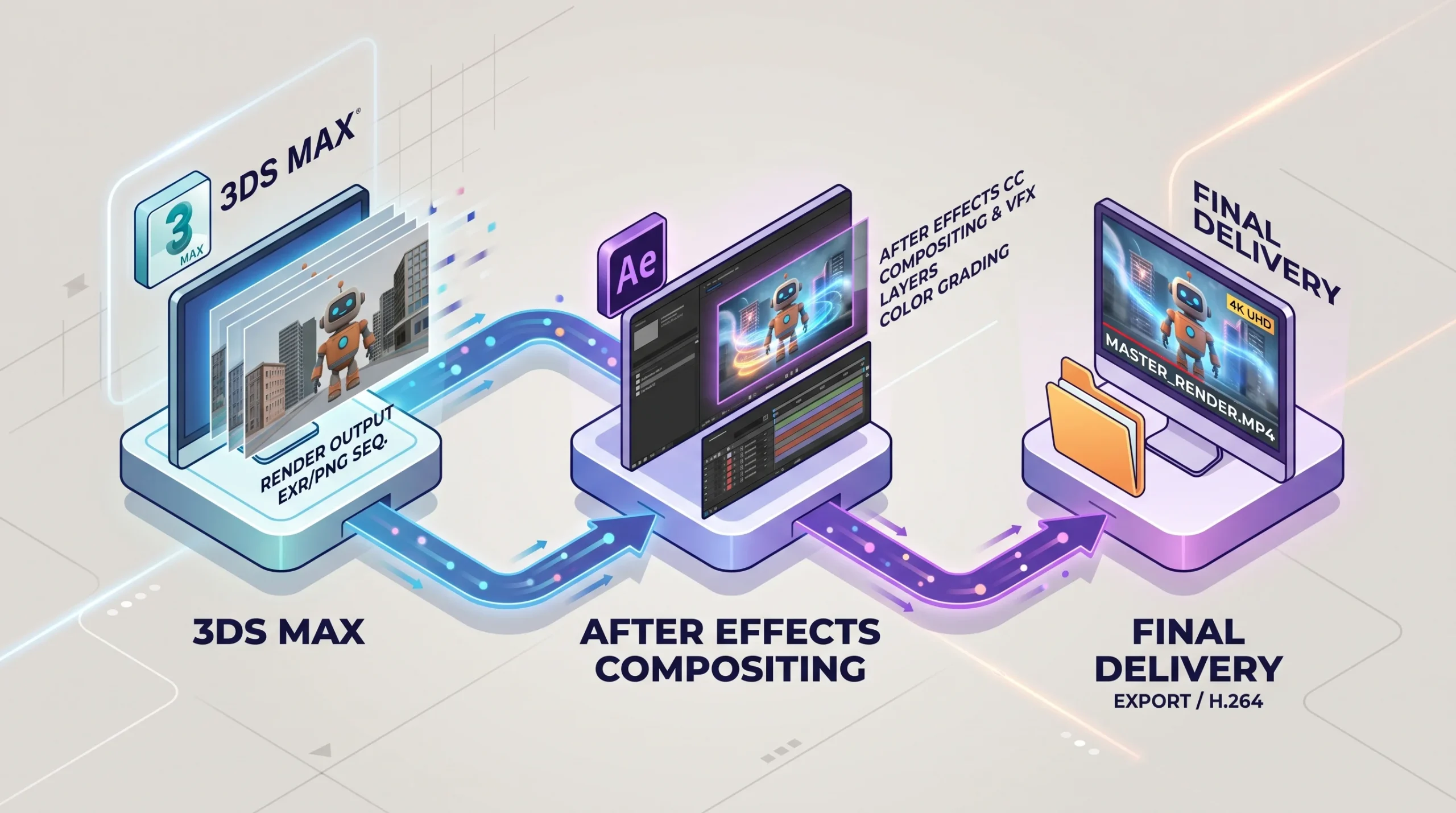
Most of our animation work starts in 3ds Max — modeling, lighting, camera moves, the render queue running overnight. After Effects shows up later, usually in one of three roles:
- Explainer videos — the educational/institutional pieces where a topic needs to be broken down with icons, diagrams, callouts, and voiceover-synced motion. These live entirely in 2D, sometimes with a 3D logo dropped in at the start.
- Compositing on top of 3D renders — adjusting color, masking elements, dropping in atmospheric effects, layering particle work that wasn’t worth simulating in the 3D scene. Half the polish on an architectural walkthrough happens here.
- Title sequences, lower thirds, and end cards — the marketing wrapper around any deliverable headed for a client’s website or sales meeting.
None of this is glamorous. It’s the kind of work that goes unnoticed when it’s done well and screams when it isn’t.
2D animation versus 3D animation — the practical view
The textbook answer is that 3D recreates reality and 2D abstracts from it. True enough. The more useful distinction, when you’re scoping a job, is about what the audience needs to feel.
A property developer pitching an off-plan tower wants photoreal renders and a flythrough that makes the building look standing-and-real. A manufacturer explaining how a piece of industrial equipment works doesn’t need photoreal — they need clarity. The mechanism cutaway, the arrow showing flow direction, the callout naming the part. That’s 2D motion-graphics territory, and that’s where After Effects earns its keep.
We’ve delivered animation series for international institutions on topics like energy efficiency — pure explainer work, mostly 2D, voiceover-driven, deliberately not photoreal because the goal is comprehension, not awe.
What After Effects for 2D animation actually does well
Rather than listing every feature in the program, here’s what we genuinely rely on:
- Layer-based compositing — every video editor uses layers, but AE’s layer model handles 2D-in-3D-space and motion-blur interactions in a way Premiere doesn’t. This matters when you’re animating illustrated elements that need parallax or pseudo-depth.
- Keyframe-driven motion with proper easing — graph editor work is what separates animation that feels alive from animation that feels like a PowerPoint transition. There’s no shortcut here.
- The built-in effects library — blurs, distortions, color correction, glow, particle effects, the 3D camera tracker for integrating graphics into live footage. Most jobs use a small subset, but the breadth means you’re rarely blocked.
- Text and title animation — the text engine is the reason AE became standard for broadcast and ad work. Per-character animation, range selectors, source-text animation on data-driven pieces.
- Integration with Premiere Pro and the rest of the Adobe stack — dynamic link, round-tripping, shared color management. When the editor is in Premiere and the motion artist is in AE, this is a real production saver.
Compositing — the half of the job clients never see
A clean 3D render isn’t a finished shot. After Effects is where we pull luminance keys to add bloom on bright windows, color-grade interiors to match a brand’s tonal palette, layer in lens dirt and chromatic aberration to make a CG shot feel filmed, and fix the dozen small problems that always show up at the end of a render.
Honest framing: most of the difference between a render that looks “rendered” and one that looks like a film still is post-production. Lighting and materials get you 80 percent of the way. The last 20 percent is comp work, and that’s almost always AE.
When After Effects isn’t the right tool
We don’t reach for AE on everything. A few cases where it’s the wrong choice:
- Long-form video editing — Premiere or a dedicated NLE. AE can edit, but you’ll fight it.
- Character animation with rigging — possible with plugins, but for proper rigged character work we’d use 3D tools or a 2D-specific package depending on the style.
- Heavy 3D scenes — render in 3ds Max with Corona, comp the result in AE. AE’s 3D space is layer-based and not a substitute for a real 3D renderer.
- Real-time interactive work — that’s our product animation or WebGL workflows, not motion graphics.
What this means if you’re commissioning an animation
If you’re a developer, manufacturer, or marketing lead deciding what kind of animation you need, the practical question isn’t “do you use After Effects?” — almost any studio will. The questions worth asking are:
- Is the goal explanation or atmosphere? Explanation usually means 2D/motion graphics. Atmosphere usually means rendered 3D.
- Is there a voiceover or narrative structure? Explainers live and die by script-to-animatic-to-final-edit discipline, not by software choice.
- How will the deliverable be used — website hero, sales meeting, trade show loop, social ads? Each has different aspect ratios, durations, and finish standards.
- Does the project also need 3D modeling, architectural rendering, or product CGI in the same package? Studios that can cover both halves in-house tend to deliver more coherent results.
That last point is where we usually fit. Most of our animation jobs combine 3D scene work with After Effects compositing and motion-graphics finishing in the same pipeline, so the seams don’t show. For background on our broader animation approach, see archviz animation.