
3D product modeling services get judged on one thing: whether the model works where you need it to — in a photoreal render, on a Shopify product page, inside a configurator, in an AR view on a customer’s phone. We build product models for manufacturers, e-commerce brands, and marketing teams, and the most common problem we solve is not “we have no model.” It’s “we have a model — engineering made it — and it’s useless for marketing.” This page walks through that gap: what we deliver, why the files you already have usually aren’t the asset you think they are, and what it takes to produce models that hold up on the platforms you actually sell through.
What our 3D product modeling services cover
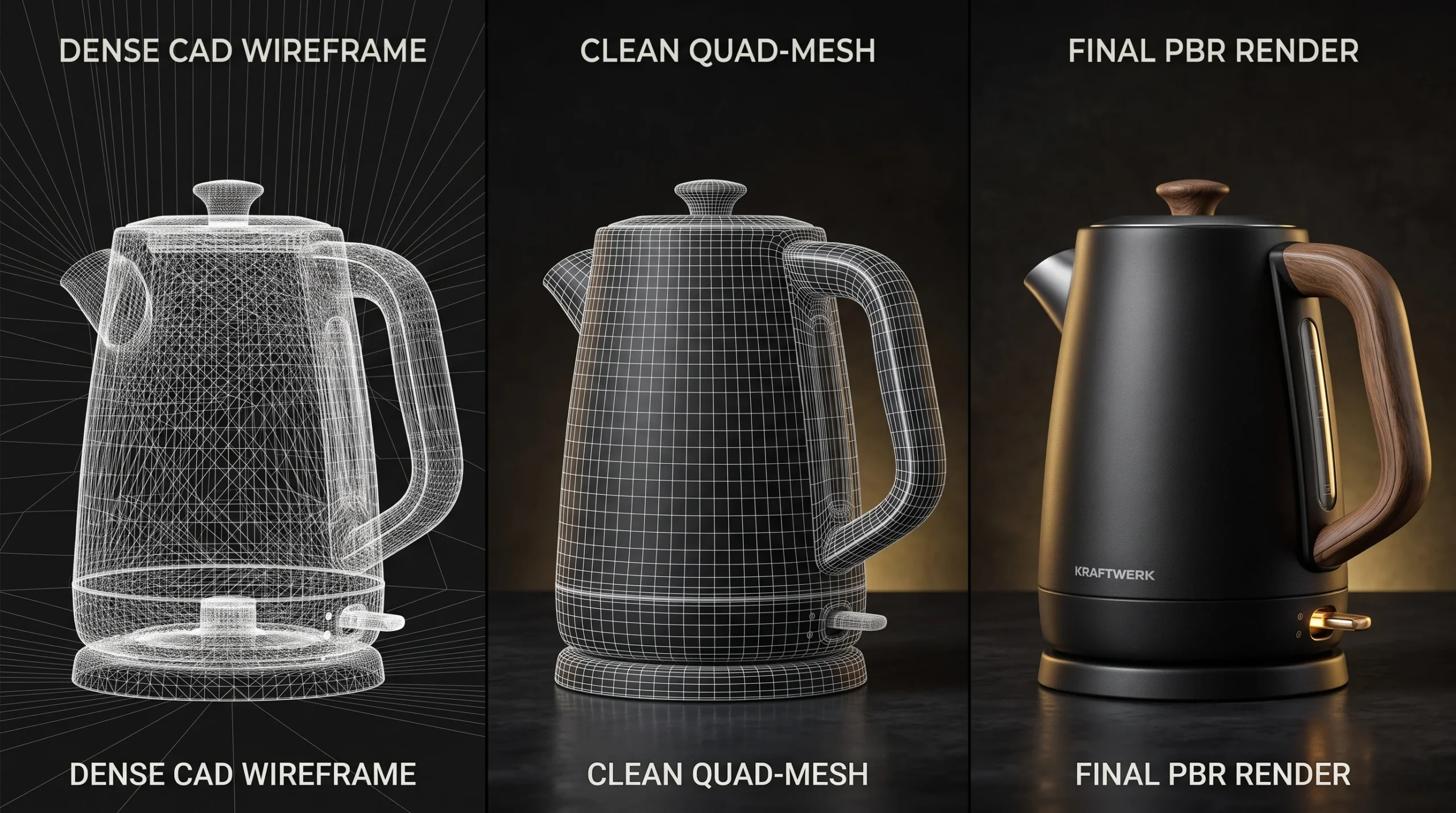
You bring whatever exists. Sometimes that’s a STEP or IGES export, sometimes native SolidWorks or Creo files, sometimes a folder of photos and a sample shipped to the studio. What comes back is a model built for the way it will be used:
- Render-ready models — clean topology and PBR materials, built for photoreal imagery and product animation.
- Web- and AR-ready assets — optimized files prepared for Shopify, Amazon, browser viewers, and mobile AR, built to load before a shopper loses interest.
- Configurator sets — a base model plus structured material, colorway, and part variants that a browser configurator can swap in real time.
The deliverable is never “a 3D file.” It’s a file that passes the requirements of wherever it’s going next. That distinction sounds pedantic until the first time a heavy model quietly kills a product page’s load time.
Accuracy gets checked against the real thing, not against taste. When a physical sample exists, materials are matched to it under neutral lighting; when one doesn’t, we work from brand color standards and material references you approve before the full build. The model has to survive being placed next to the physical product — in a catalog, on a comparison page, in a showroom — and that bar is set at the start, not discovered at review.
Why your CAD file isn’t the model you need
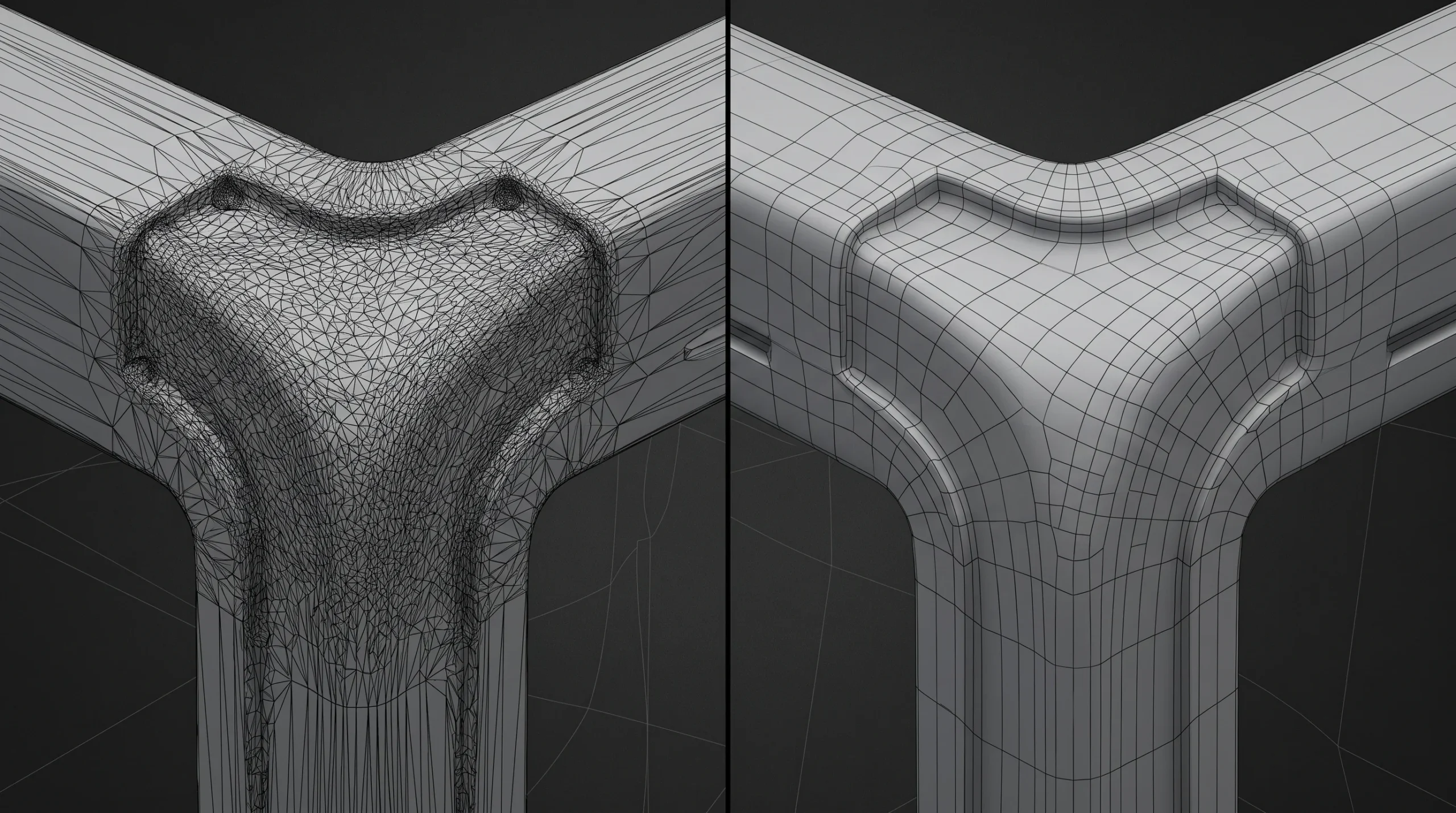
This is the part that surprises manufacturers most. A SolidWorks file and a commerce-ready 3D asset describe the same object for two different jobs. CAD is often an excellent source for accurate rendering — visualization tools tessellate engineering surfaces for you, and plenty of manufacturers already get good stills straight out of it. The gap opens when that same data has to become a lightweight, structured asset for a web viewer, an AR view or a configurator.
CAD systems describe geometry as mathematically exact surfaces, and anything downstream has to convert those surfaces into triangles. A naive conversion of an industrial assembly produces a mesh with millions of faces, no UV layout to hang materials on, and far too much weight to load comfortably on a phone. That is survivable on a workstation rendering a still. It is not survivable in a browser, on a phone, or inside a configurator that has to swap parts in real time.
How much of the following a project needs depends entirely on where the asset is going — a print still and a phone AR view are not the same job:
- Retopology and optimization — rebuilding the mesh at a polygon budget the target platform can handle, without visibly losing the design.
- UV unwrapping and texture baking — the unglamorous step that makes realistic materials possible at all.
- PBR texturing — materials that respond to light the way the physical product does, delivered in the exact map format each platform expects.
- Compression — meshes and textures cut to a fraction of their size with no visible loss; regularly the difference between a model that ships and one that gets rejected.
None of this is knowledge you need to keep. It’s knowledge you’re hiring.
One boundary worth stating: we translate engineering data into marketing assets — we don’t produce or alter engineering data itself. Your CAD stays the source of truth for manufacturing; our model is the version of it the rest of the world sees.
Built to platform spec: Shopify, Amazon, and AR
“Can you send it as a GLB?” is where most product-model projects either prove out or fall apart, because every platform has real requirements, and they are easy to miss until an upload is rejected or silently re-optimized.
For Shopify, 3D product media comes down to two file formats, GLB and USDZ. The catch buyers actually hit is weight. Shopify’s own guidance to the partners who build these tells them the GLB “should be approximately 4 MB” and “must not exceed 15 MB” — and 4 MB is a great deal less room than an engineering assembly takes without preparation. We deliver a model already optimized and tested against that target, rather than uploading something heavy and finding out what the platform does with it. Upload one well-made GLB and Shopify generates the USDZ itself: a single correct file covers the 3D viewer, Android AR, and Apple’s Quick Look.
Amazon takes GLB and glTF models, uploaded through Seller Central’s Image Manager by sellers enrolled in Brand Registry, and uses them to power View in 3D, View in Your Room, and Virtual Try-On for eligible categories. Different platform, stricter budgets, same principle: the file has to pass their validation, not ours.
Across web commerce more broadly, the usual delivery targets are browser GLB viewers, Android AR, and Apple’s Quick Look — with each platform layering its own validation and eligibility rules on top. There is an established industry reference for all of this: the Khronos Group’s Asset Creation Guidelines 2.0 for commerce-ready glTF assets, released in August 2025. We build to it.
Delivery includes proving it. Before files go out, models get loaded in the viewers they’ll actually live in — model-viewer for the web build, Quick Look on a physical iPhone — because a model that looks right in a 3D package and wrong on a phone is wrong. Testing on the target rather than the workstation is, in our experience, the easiest step to skip and the most expensive one to skip.
Does any of this move revenue? Shopify still cites markedly higher conversion for merchants using 3D and AR content — the widely repeated 94% figure comes from its earlier merchant data, so treat it as directional, not a forecast for your store. Results vary with category, implementation quality, and buyer intent. What can be said with confidence: Amazon and Shopify both continue to support 3D shopping experiences — the shelf space for well-prepared assets keeps growing.
Platform requirements above were checked against Shopify and Amazon documentation in July 2026. Platforms revise these; tracking the revisions is part of the service.
What drives the cost of 3D product modeling
We don’t publish a rate card for this work — not because pricing is a secret, but because two “one product” briefs can be a week apart in effort. What actually moves the number:
- Geometry complexity — a molded bottle and a mesh-back office chair are different jobs, even at the same visual quality.
- Deliverable targets — render-only models skip the optimization work; web/AR assets carry the full budget-and-compression pass.
- Variants — colorways and configurable parts multiply texturing and QA time, though far less than linearly when planned upfront.
- Source material — clean CAD is the fastest start; photos-only modeling means rebuilding geometry from reference.
- Volume — catalogs price differently than one-offs, because setup and material libraries amortize.
The market splits visibly here: marketplaces sell per-asset geometry at commodity prices, studios sell the whole path to a working asset. Both are legitimate. The mistake is buying the first when you needed the second — usually discovered on upload day.
What you receive
Deliverables get agreed at the brief, for the same reason the price does — a render-only job and a configurator asset do not end the same way. What is normal:
- Exports for your actual targets. GLB, FBX, OBJ, USDZ or renderer-native, settled at the start so the files drop into your pipeline instead of needing conversion at your end.
- Texture maps with the model. Wherever the 3D model or the source scene is part of the delivery, the maps come with it.
- Source scene files, on request. Available, and worth raising before work starts rather than after — it is a scoping decision, not an afterthought.
- Two revision rounds included. Further rounds are quoted separately. Anything we got wrong — a missed spec, a mistake at our end — gets fixed regardless of where the round count stands.
- Validation evidence if you want it. Target-platform testing happens on every job anyway; if you need the Shopify or Amazon checks documented for your own records, ask and it ships with the files.
Where modeling stops and rendering begins
Product modeling is one stage of a pipeline, and it’s worth being precise about the borders, because they’re where budgets get confused:
- If you need photoreal imagery for a catalog or campaign, that’s our product rendering service — modeling feeds it, but shots, lighting, and scenes are their own work.
- If the goal is a physical object, printable files have entirely different rules — watertight geometry, wall thickness — covered by our 3D modeling for 3D printing service.
- If you want shoppers configuring the product live in a browser, the models built here are exactly what our interactive 3D presentations run on.
Same studio, same source files, different disciplines. Bringing them under one roof is mostly a coordination advantage: the product gets built once from one validated source, and the derivatives each channel needs get prepared from it — rather than the product being modeled from scratch again for every place it has to appear.
Who this is for
Manufacturers with CAD libraries and no marketing-usable assets. E-commerce brands that need product pages and AR views that don’t embarrass the product. Marketing teams replacing reshoots with a model they can relight, recolor, and reuse for years. If your product exists — or will soon — and needs to be seen accurately everywhere it’s sold, that’s the brief.