
The phrase low poly character creator covers a surprisingly wide range of tools and workflows — from drag-and-slider web apps that spit out a riggable avatar in five minutes, to a full studio pipeline that takes a concept sketch and ends with a textured, rigged, game-ready model under a strict polygon budget. They are not the same thing. And the difference matters more than most product pages admit.
This article is the version we’d write for a client who’s about to commission character work and wants to understand what they’re actually buying. No “unleash your creativity” pitch. Just the pipeline, the tradeoffs, and where a low poly character creator fits next to the other ways of making a character.
What “low poly” actually means in 2026
Low poly used to mean blocky. PS1-era blocky. That definition is dead.
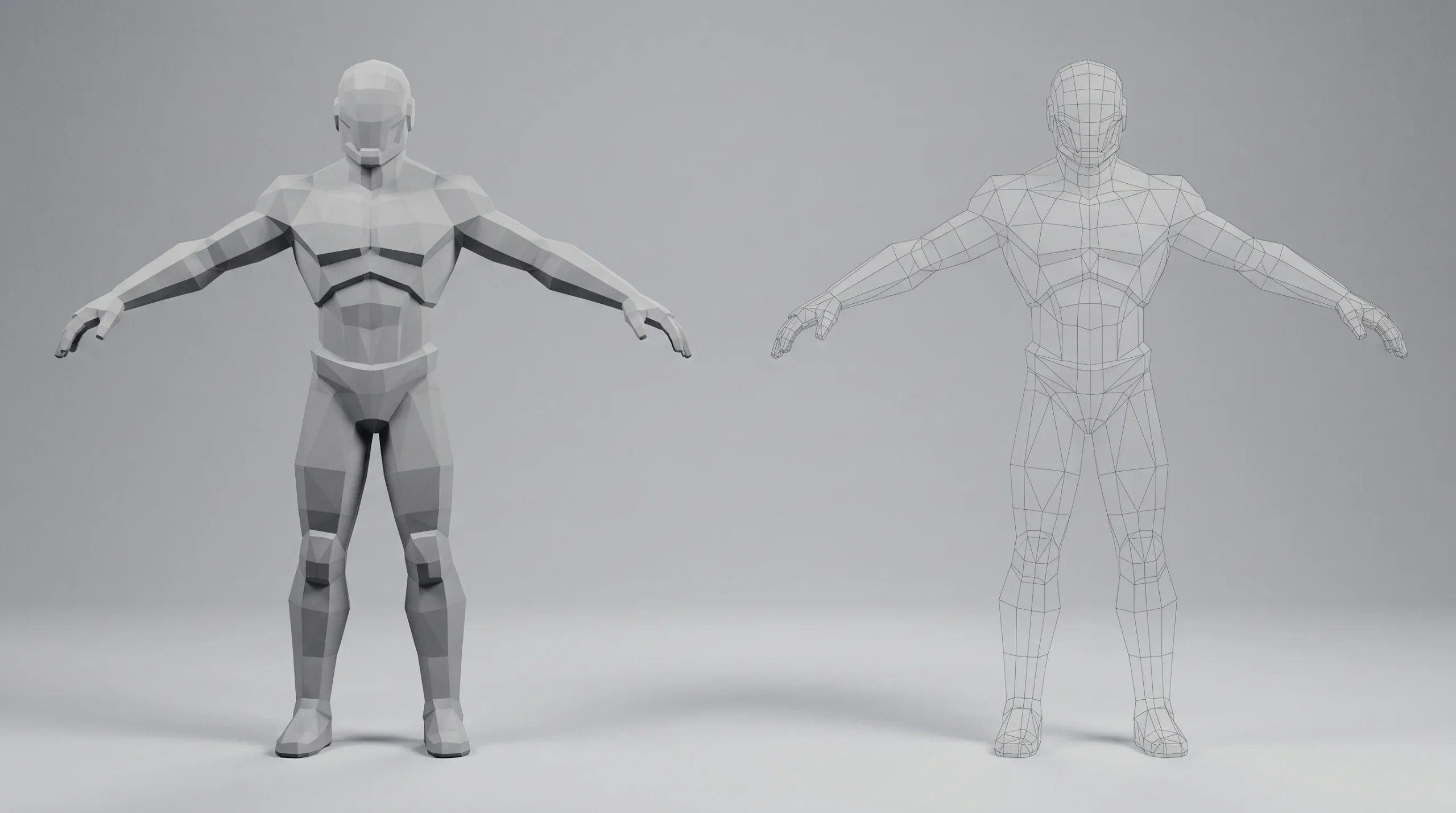
Today, a low poly character is one whose triangle count fits the target engine’s budget for that character’s role. A hero character in a mobile game might run 8,000–15,000 tris. A background NPC, 1,500–3,000. A character in a Three.js / WebGL configurator that has to load over the open internet — often under 10,000, and sometimes much less. Console hero characters can sit at 60,000+ and still be called “low poly” relative to the sculpt they were retopologized from.
So when someone says they want a low poly character creator, the first useful question is: what platform, and what role does the character play in it? A web viewer, a Unity mobile build, an Unreal PC title, and a VR headset all impose different budgets and different shader assumptions.
What a low poly character creator actually has to do
Whether it’s a one-click web tool or a six-week studio engagement, a finished low poly character has to clear the same checklist:
- Polygon budget respected. Tri count fits the platform, with most of the budget spent where silhouette matters — head, hands, hero props — and the rest economized.
- Clean topology. Quads where deformation happens (shoulders, elbows, hips, jaw), edge loops that support animation, no n-gons in problem areas.
- Proper UVs. No stretching on the face, no wasted UV space, seams hidden where the camera won’t see them.
- Baked maps. Normal, AO, sometimes curvature — baked from a high-poly sculpt so the low poly reads as much richer than its geometry suggests.
- Rig that matches the animation system. Humanoid skeleton for Unity Mecanim or Mixamo; custom rig if the engine and animation needs require it.
- Export that the engine accepts cleanly. Usually FBX or glTF. Correct units, correct axis, no broken bone weights.
A web-based low poly character creator hands you most of this in a black box. A studio pipeline gives you all of it, plus the freedom to deviate from the template wherever the brief demands it.
The three paths to a low poly character
Path 1: Pre-made / generator tools
Tools like Character Creator, MakeHuman, and various web-based avatar builders. (Ready Player Me, once the best known of these, was acquired by Netflix and shut down in January 2026 — a reminder that generator platforms can disappear out from under a project.) You pick a body type, push some sliders, dress the character, and export. Mixamo handles the rigging and gives you a library of basic motions.
This path is fast and cheap. It’s the right choice for placeholder characters, internal demos, and projects where the character isn’t the focus of the experience. It falls down the moment art direction matters — when the character has to look like your brand mascot, your villain, your specific concept art, and not a slightly customized version of the same face everyone else’s project is using.
Path 2: Box-modeled low poly from scratch
An artist starts in 3ds Max, Maya, or Blender and builds the character directly in low poly. No sculpting step. This is the classic mobile-game and stylized-game workflow, and it’s still very alive for cartoon characters, chibi proportions, and stylized art directions where realistic anatomy isn’t the point.
Faster than the sculpt-and-retopo path. Cheaper. But it limits how rich the final shading can be, because there’s no high-poly source to bake detail from.
Path 3: High-poly sculpt, then retopologized to low poly
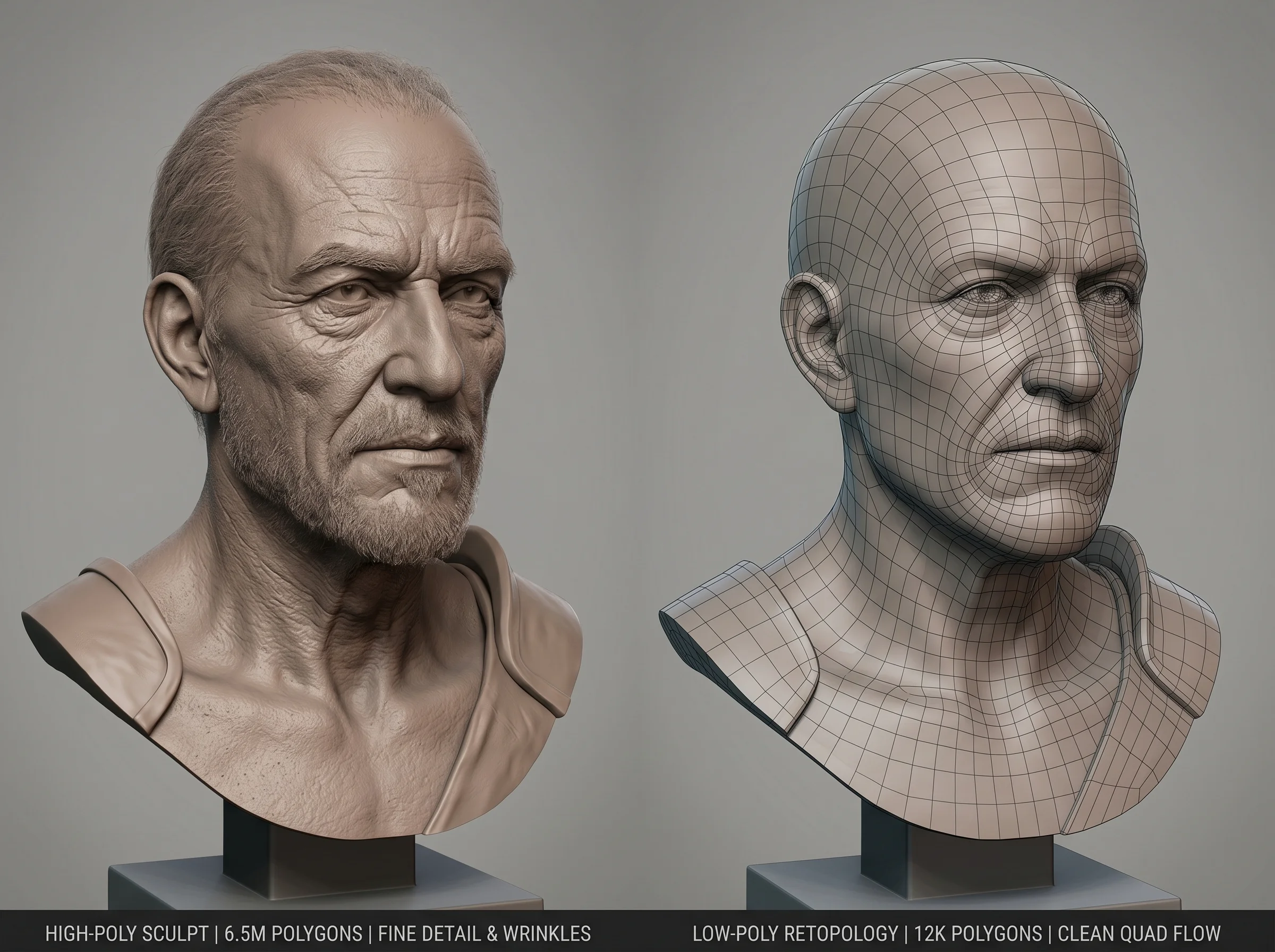
This is what the studio uses when the character has to read as detailed and the engine has a real budget. We sculpt in ZBrush (or Blender for some projects), establishing all the fine detail — pores, wrinkles, fabric folds, asymmetry. Then we retopologize down to a clean low poly mesh, lay out the UVs, and bake the high-poly detail into normal and AO maps that the low poly mesh wears as textures.
The low poly model ends up under budget. The shading reads as if it weren’t. That’s the trick.
Where the original article got it half right
The previous version of this page kept circling around sculpting — high-poly sculpting, brushes, layers, switching between detail levels — and labelled it all “low poly.” That’s a real confusion worth clearing up.
Sculpting is part of the pipeline. It is not the whole pipeline. The sculpt by itself isn’t shippable to any real-time engine — it’s millions of triangles, has no clean topology, and won’t deform. The low poly version, baked from that sculpt, is the asset that ships. Conflating the two is a common mistake, but it makes commissioning work confusing because you can end up paying for one and expecting the other.
If the work product is a still render for a film frame, a sculpt is enough. If the work product runs in a game, a configurator, a VR scene, or a web viewer — you need the full low poly pipeline.
What our character workflow looks like
For projects where we deliver the full pipeline, the rough sequence is:
- Concept lock. 2D concept art, turnaround sheet, reference board. Nothing 3D starts until silhouette and proportions are agreed.
- Blockout. Rough low poly proxy in 3ds Max or Blender — checks proportions in 3D, often inside the target engine if we have it.
- High-poly sculpt. ZBrush. All the surface detail goes here. You can read more about how we use ZBrush in our character pipeline.
- Retopology. Building a clean low poly mesh that captures the silhouette of the sculpt, respects the polygon budget, and has topology that will deform correctly.
- UV unwrap. Seams placed thoughtfully, density balanced.
- Texture baking. Normal, AO, curvature, sometimes ID maps. Detail transferred from the sculpt to the low poly.
- Texturing. Substance Painter or hand-painted, depending on art direction.
- Rigging and skinning. Humanoid skeleton for Mixamo / Mecanim compatibility, or a custom rig for non-humanoid forms or specific animation needs.
- Test in target environment. Drop the asset into the actual engine or web viewer. Check shading, animation, performance.
- Export and handoff. FBX or glTF, with documentation on rig, materials, and any quirks.
Not every project needs every step. A stylized mobile NPC might skip the sculpt entirely. A hero character for a marketing piece might stop at rendering and never need rigging. The pipeline flexes — but the structure is roughly the same.
How to brief a low poly character commission
Most of the friction in character commissions comes from underspecified briefs. The things that actually matter:
- Target platform and engine. Three.js / WebGL? Unity mobile? Unreal? Standalone VR? Different answers, different budgets.
- Polygon budget. If you don’t have one, say so — we’ll suggest a sensible range. But don’t leave it open and then complain the model is heavy.
- Animation system. Mixamo, Mecanim, a custom rig, or pre-baked animations only?
- Texture resolution and channels. One 2K diffuse? Full PBR set at 4K? Will normals be supported in the runtime?
- Art direction. Concept art, reference, or a description detailed enough that we don’t have to guess. “Stylized” alone is not a brief.
- Deliverables. Source files? Engine-ready package? Both?
A 20-minute conversation up front saves a week of revision later. We’ve seen projects lose two months because nobody asked which engine the character was going into.
When a low poly character creator is the wrong answer
Sometimes the right call is not to go low poly at all. If the character only ever appears in pre-rendered images or video — a marketing render, a film frame, a cinematic — the engine doesn’t care about polygon count. You render the high-poly sculpt directly. Building a low poly version is wasted work.
If the character only ever appears in static 2D illustrations, you might not need 3D at all.
Low poly is the right answer when the character has to run in real time. Game, configurator, VR/AR, web viewer, interactive walkthrough. Otherwise it’s solving a problem you don’t have.
Where this sits in our work
Character work is a secondary offering for us — most of our 1,500+ projects over 2 decades have been architectural visualization, product CGI, animation, and interactive WebGL applications. But we do take character commissions when the scope is clear, and the low poly / game-ready pipeline is well within what the studio can deliver. If you’re scoping something larger that includes a character inside an interactive experience, that’s where it gets interesting — and where the breadth of broader 3D solutions matters more than character specialization alone. For brand mascots and character identity work specifically, the 3D character design service page is the right starting point.