
3D product visualization is the practical answer to a problem most manufacturers and retailers know intimately: you need to show a product before the tooling is finalized, before the first run, sometimes before the supplier has agreed on a finish. A render gets you to a decision-ready image without the expense of a photo studio or the lag of a physical sample. That is the job. Everything else — the lighting tricks, the camera angles, the slick turntables — is in service of that.
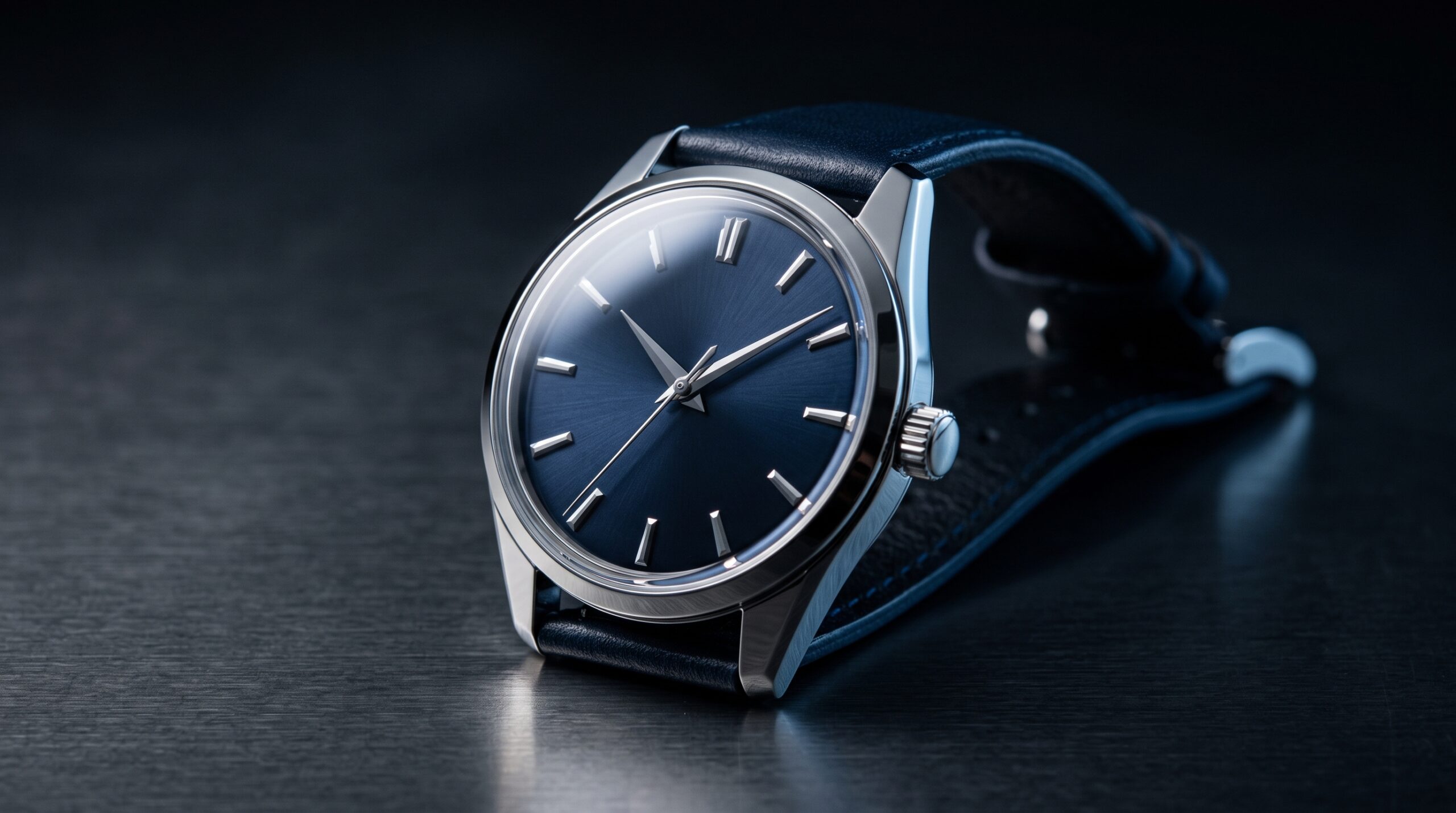
We have spent over 2 decades producing product CGI across furniture, consumer goods, industrial machinery, and equipment categories. The patterns are familiar by now. Most projects walk in the door as a folder of CAD files, a few reference photos, and a brief that says “make it look like the photo, but better.” The work after that is mostly invisible to the client, and we think that is the right way to talk about it.
What 3D product visualization actually covers
The category is broader than the term suggests. On any given month we are usually working on some mix of the following:
- Hero product stills for e-commerce, packaging, and marketing campaigns — clean studio shots, lifestyle context shots, banner-ready compositions in whatever aspect ratios the campaign needs, and the occasional exploded-view diagram.
- Catalog libraries — hundreds of SKUs, multiple finishes, consistent lighting, delivered as a structured asset set.
- Configurator-ready assets for online customization tools (renders pre-baked per option, or geometry handed off for real-time use).
- Turntables and 360° spins for product pages and configurators.
- Explainer and product-demo animations for ad spots, trade-show loops, and YouTube product pages — exploded views, assembly sequences, how-it-works walkthroughs.
- Industrial and machinery visuals where the audience is engineers and procurement, not consumers.
- POS, packaging mockups, and labels rendered ahead of the print run so the packaging team can sign off without ordering samples.
Deliverables are the usual web and print formats — PNG with alpha, JPG, layered PSD with separate passes (diffuse, reflection, shadow, AO, alpha) so your retoucher can keep working, plus the final video for animation work. When the deliverable is the model itself rather than the image, we hand over render-ready assets for your own pipeline, a web configurator, or a downstream agency.
Source and project files are not included by default. Some assets we work with carry licences that cannot be transferred, so it is worth raising early — tell us what you need to own and we will scope the job around it.
If the project is a high-volume catalog job (think hundreds of SKUs for an online retailer), we’ve done that scale of work before and we’ll set up the asset pipeline accordingly — shared shaders, naming conventions, a render queue you can audit. Doing one render and doing 400 are different problems.
The CAD cleanup nobody warns you about
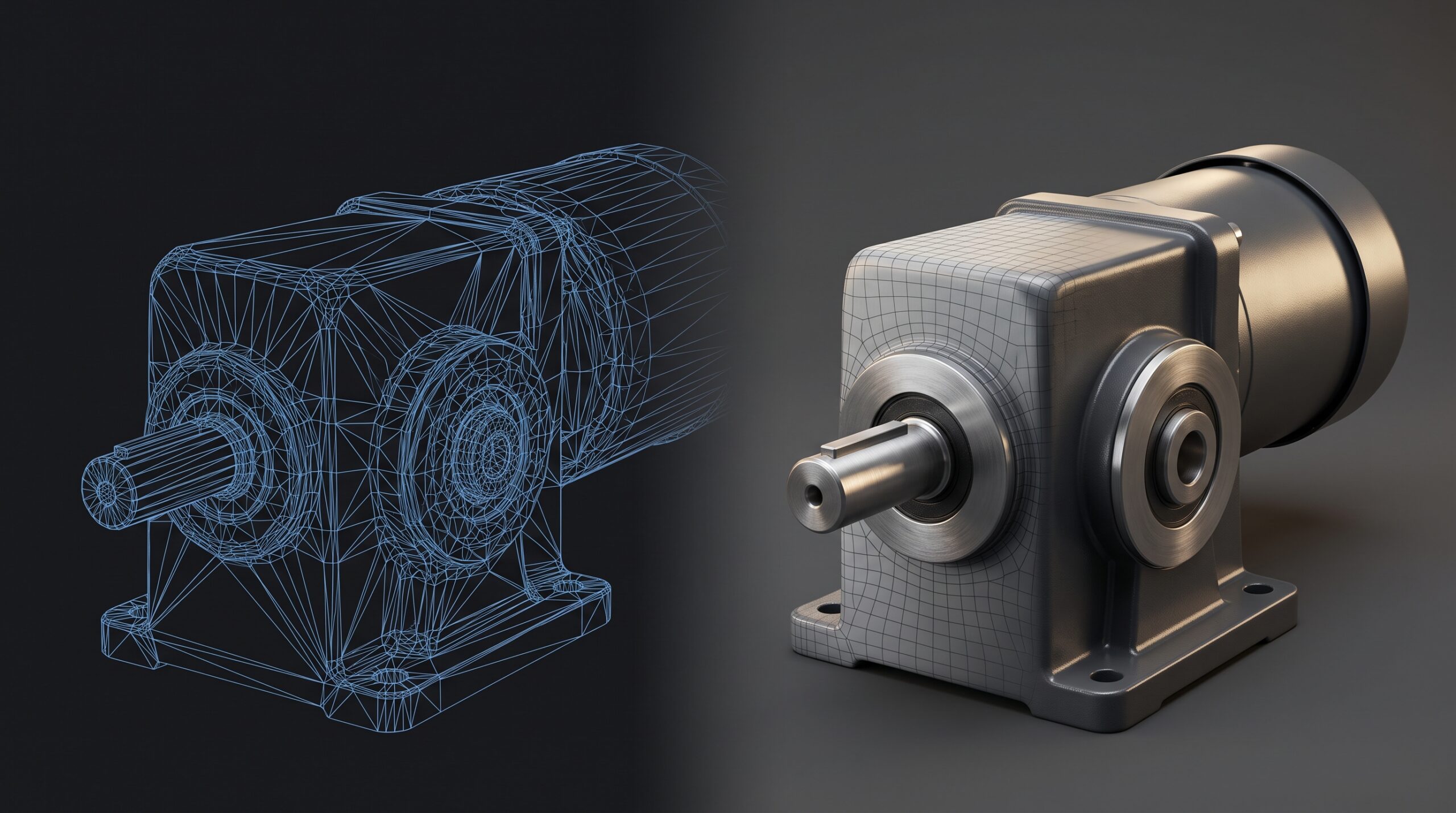
If your product was designed in SolidWorks, Inventor, Creo, or any other engineering CAD platform, the geometry can be perfectly accurate and still not be a finished marketing asset. This is the part of product CGI that surprises new clients most often, so it is worth being plain about it.
Native engineering CAD describes a product as a tree of features — extrudes, fillets, parametric relationships, exact tolerances. That is exactly what manufacturing needs. It is not what a renderer needs. STEP, IGES, and native files can come into 3ds Max either as editable meshes or as Body Objects, and how much work lands on us depends on the source file and the import settings. Common ones: tessellation dense enough to slow everything down, or coarse enough to facet under studio lighting, plus normals to correct, missing UVs, and surfaces that look fine in wireframe and fall apart the moment light hits them.
So before the visible work begins, there is a quiet stage of:
- Importing the STEP / IGES / Parasolid / native CAD file and rebuilding what does not survive the trip.
- Retopologizing high-polygon imports so the file is manageable — we have had single-bolt assemblies arrive at half a million polygons each.
- Fixing normals, smoothing groups, and shading errors that only become obvious when light hits them.
- Unwrapping UVs so materials sit correctly, especially for anything with branded graphics, decals, or printed labels.
- Removing internal geometry the camera will never see — important on machinery, where the engineering model includes every washer.
- Replacing CAD-stitched curves with clean topology where the model will need to deform or animate.
For a single hero shot on a small consumer product this might be a few hours of cleanup. For a piece of construction equipment or an assembly with hundreds of sub-parts, CAD prep can easily be the largest line item in the project. We mention it not to pad the conversation but because clients deserve to know where the time goes. In our experience most avoidable rework traces back to incomplete or rushed CAD prep — get this stage right and the rest moves fast.
What we need from you
The cleaner the input, the faster the first render. In rough order of preference:
- STEP, IGES, or other CAD files — ideal. We import directly, clean up the geometry, fix normals, and rebuild materials. Most industrial product work starts here.
- Native 3ds Max, Blender, or SolidWorks files — also fine, even better when materials are already roughed in.
- Drawings, dimensions, and reference photos — works for furniture, consumer goods, and anything where you don’t have CAD. Slower start, but we’ve modeled plenty of products from a tape measure and a phone gallery.
- Brand guidelines, color codes, and material samples — anything that pins down the look you actually want. Pantone numbers and finish photos beat “make it look premium” every time.
If you don’t have any of the above and you’re starting from a concept sketch, we can still help — that’s closer to 3D prototype design than visualization, and the conversation shifts from “render what exists” to “design and render what could.”
Where 3D product visualization earns its keep
The pitch for product CGI usually focuses on cost versus a photoshoot, and that comparison is real — studio rental, photographer day rates, retouching, multiple finish samples shipped in, the whole bill. But the cost case is the obvious one. The interesting cases are the ones where photography simply cannot produce the result you need:
- The product doesn’t exist yet. Pre-launch marketing, investor decks, packaging artwork, trade-show materials — all needed before the first unit comes off the line.
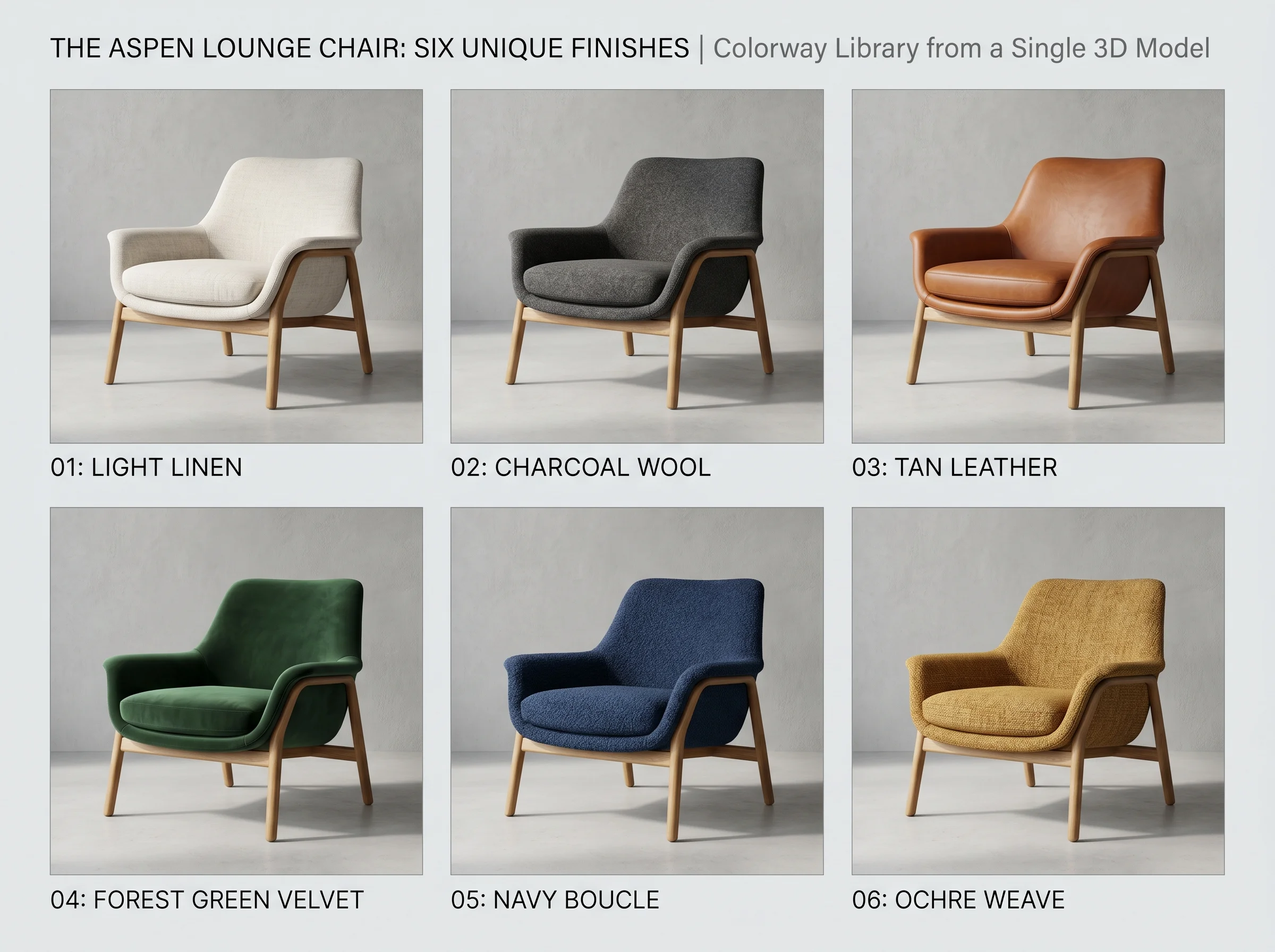
- You sell variants. One model and a material library replace a shoot per combination.
- The environment is the problem. Heavy machinery in a clean factory shot. A kitchen appliance in a kitchen that doesn’t exist yet. Outdoor furniture in golden hour without paying for a location.
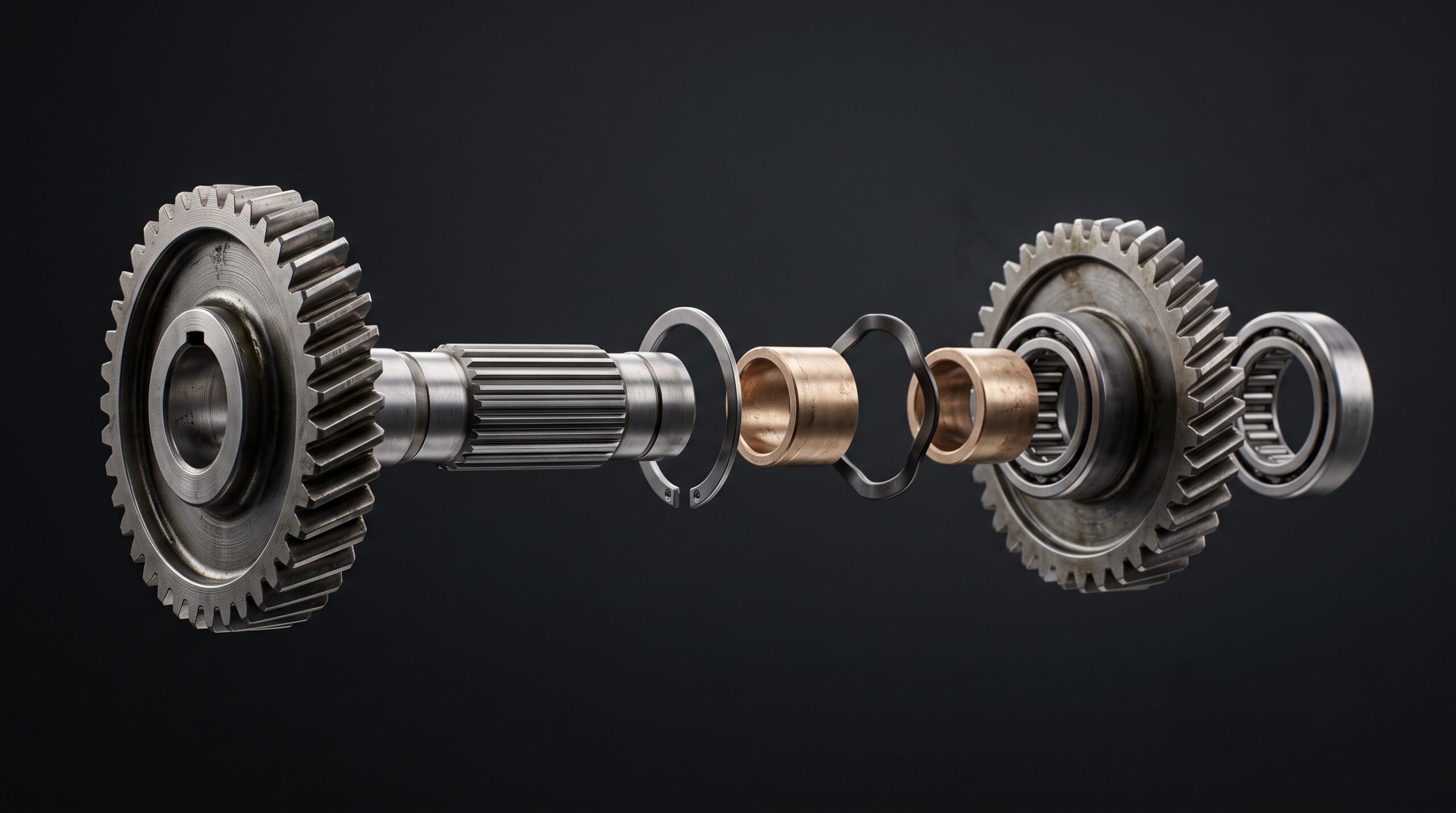
- You need an exploded view or cutaway. Photography can’t show the inside of a sealed product. We can.
- Catalog consistency matters. Every product on the same backdrop, same lighting, same angle, year after year, with no drift from one photoshoot to the next.
Those conditions show up differently depending on what you make.
Furniture and large-catalog retail
In high-volume, variant-heavy furniture catalogs, CGI now handles a substantial share of the product imagery. The reason is volume. A furniture brand with 400 SKUs and four upholstery options per piece is not going to shoot 1,600 product photos every season. Once the 3D models exist, the same chair can be rendered in every fabric, every wood stain, every colorway, and dropped into any lifestyle scene the marketing team imagines. New colorway next quarter? Re-render, do not reshoot.
Many major furniture retailers adopted this approach years ago, and the pattern is now common: build a clean model library, render the variants on demand, composite into room scenes for catalog and web. We have built several such libraries — the work is more about pipeline discipline than hero shots, and the studios that do it well are the ones that take the file management as seriously as the lighting.
Industrial machinery, equipment, and B2B products
For a manufacturer selling a piece of construction equipment or a factory-floor machine, photography has practical limits. The product is heavy, it is at the customer site, it is dirty, the lighting at the warehouse is terrible. A render solves all of that. More usefully, a render lets you isolate components — show a cutaway, highlight a wear part, animate an assembly sequence — in ways no camera can. That is genuinely useful for engineers and buyers who need to see how something works, not just what it looks like.
For B2B sales decks and trade-show booths, the same model gets reused across stills, an explainer animation, and sometimes a product animation for the website. One asset, multiple deliverables.
Pre-production, packaging, and finish decisions
Renders also do real work before a product ships. A packaging team reviewing a die-line with a photoreal mockup makes faster decisions than one reviewing a flat artboard. A product team deciding between two anodizing finishes can see both side by side, because once the model and lighting are approved a finish change is a material swap rather than a new shoot. These are small moments, but they remove the “let’s order a sample and see” delay that quietly costs weeks across a launch schedule.
We have had projects where the visualization stage caught a geometry issue the engineering review missed — a parting line falling on a visible face, a fastener pattern that looked symmetrical in CAD and obviously wrong under directional light. Not the main reason to render, but a useful side effect.
Advertising and campaign work
For commercial work, 3D is often the only way to get the shot. Liquid pouring in slow motion at exactly the angle the storyboard demands, an exploded view of a device that does not exist yet, a moody hero render of a watch with reflections you would spend two days lighting on set. CGI turns up in a great many product ad spots now — especially where the shot needs impossible camera moves, simulated liquids, internal views, or a product that does not exist yet. The line between “real” and “rendered” has stopped mattering to anyone outside the production team.
Our process, roughly
Every job is different but the shape is similar:
- Brief and scope. What the deliverables are, how many, what aspect ratios, what’s the final use. Half the project happens here. Vague briefs produce expensive surprises.
- Modeling. CAD import and cleanup, or modeling from scratch. We flag anything geometric that won’t read well at the final render resolution and ask before we polish it.
- Look development. Materials, lighting, camera. Usually one or two early WIP frames at this stage so we’re not all surprised at the end.
- Render and post. Final passes out of Corona, retouching in Photoshop where it’s faster than redoing the render. Both are normal — anyone delivering raw, unprocessed frames is leaving quality on the table.
- Delivery and revisions. Layered files where useful. The number of review rounds is set in the scope up front, so nobody is guessing halfway through.
If the brief expands mid-project, we say so before we start the extra work — not after the invoice.
Tools and pipeline
The bulk of our product work runs through 3ds Max with Corona Renderer. For organic shapes and certain sculpting tasks we use ZBrush or Blender. When the source files are engineering CAD, we lean on the import path through SolidWorks and 3ds Max’s CAD utilities. For configurator-bound assets that need to live in the browser, geometry gets retopologized and optimized for real-time delivery.
Animation work uses the same 3D pipeline plus After Effects and Premiere for finishing. The output is whatever the campaign needs — 4K masters, vertical cuts for social, looping versions for trade-show screens.
Who this service is for
Our product work comes both through agencies — who typically have a client with a deadline and no usable photography — and direct from manufacturers launching a new SKU, refreshing a catalog, or building out assets for a configurator. In practice the clients who get the most out of product CGI fall into a few groups:
- Product manufacturers launching consumer goods, appliances, or industrial equipment who want pre-launch marketing material before the first production unit exists — or a single visual library that works across web, print, trade-show, and packaging.
- Furniture and home-goods brands running large SKU catalogs where photography would be impractical or repetitive.
- Marketing teams and creative agencies producing ad campaigns, explainer videos, and trade-show content — particularly where the product is too large, too small, not yet built, sold in a hundred color variants, or needs to be shown in environments that would cost a fortune to stage.
- E-commerce operations that need consistent hero shots and 360° spins across an entire catalog, without re-shooting every season.
- Engineering and B2B sales teams using visuals for proposals, technical documentation, and customer presentations.
- Manufacturers building product configurators who need the 3D base assets that drive material and option swaps in the browser.
For agencies who handle the campaign strategy and just need the assets delivered clean, we are happy to slot in as the production studio. For direct clients without an agency in between, we will scope the work end to end.
Where photography still wins, and what we do not do
Photography is sometimes the right answer and we will tell you when it is. Anything truly textural and tactile where the material itself is the sell — handmade leather, hand-finished wood with character grain, fabrics where the weave is the whole story. We can render those, but the production cost goes up and at some point a good photographer is more sensible. We’ll say so.
The same honesty applies to scope. We do not do production engineering — if you need a part designed for injection molding tolerances or a precision mechanism worked up to manufacturing spec, that is engineering work and we are a visualization studio. We can model from your engineering team’s output and produce the visuals around it. We are also not the right partner for stamped patent-illustration work or anything that needs a registered engineer’s sign-off.
What we can do is take a brief that starts with CAD files and a deadline and end up with finished imagery, animation, and configurator-ready assets — without you having to coordinate separate modeling, rendering, animation, and interactive-production vendors.
Track record
The studio has delivered over 2 decades of product visualization work — large furniture libraries for online retailers, configurator asset packages, industrial machinery for marketing campaigns, consumer products for advertising, and one-off renders for small businesses. We’re not the best viz studio in the world at any one narrow niche. We’re a studio that’s done a lot of product work, across a lot of categories, and can usually see the shape of your project from the first email.
How this connects to our other product work
3D product visualization sits inside a broader product pipeline. Same software, same team, related deliverables:
- If your need is more about catalog-grade still renders at volume, see our notes on 3D product rendering services.
- If the model itself is the deliverable — built from CAD files, photos, or a physical sample, then optimized to load on a product page or in AR — that is 3D product modeling services.
- If you’re a furniture brand specifically, we’ve covered the workflow particulars in 3D furniture modeling.
- If you need motion — assembly animations, feature walkthroughs, short ads — that’s the animation side of the same pipeline.
- If you need interactive 3D in the browser (configurators, material switchers, web showrooms), we build those too. That’s one of the things that genuinely sets us apart from typical viz studios.
- If you are still comparing studios, our guide to choosing a 3D product visualisation company sets out what to check before you brief anyone, including us.
Questions we get before a product visualisation brief
What files do you need to start?
In order of preference: STEP, IGES or other engineering CAD files, which we import directly; native 3ds Max, Blender or SolidWorks files, better still if materials are roughed in; or drawings, dimensions and reference photos where no CAD exists, which is slower to start but works for furniture and consumer goods. Brand guidelines, colour codes and material samples pin down the look far better than a description does. Starting from a concept sketch is possible too, but that is closer to 3D prototype design than visualisation.
Why does CAD cleanup take time?
Engineering CAD describes a product as a tree of features and exact tolerances, which is what manufacturing needs and not what a renderer needs. Before any visible work starts we rebuild what does not survive the import, retopologise high-polygon parts, fix normals and shading, unwrap UVs so decals and labels sit correctly, and strip internal geometry the camera will never see. For a single hero shot of a small consumer product that is a few hours. For a piece of construction equipment with hundreds of sub-parts it can be the largest line item in the project, which is why we flag it up front.
What do we receive at the end?
The usual web and print formats: PNG with alpha, JPG, and layered PSD with separate passes (diffuse, reflection, shadow, ambient occlusion, alpha) so your retoucher can keep working. Animation jobs deliver the finished video in whatever cuts the campaign needs. Source and project files are not included by default, because some assets carry licences that cannot be transferred; tell us early what you need to own and we scope the job around it.
When is photography the better choice?
When the material itself is the sell and it is truly tactile: handmade leather, hand-finished wood with character grain, fabrics where the weave is the whole story. CGI can get close, but for those a good photographer is often the better spend and we will say so. CGI wins when the product does not exist yet, when you sell many variants, when the environment is the problem, when you need an exploded view or cutaway, or when catalogue consistency across seasons matters.